



 Full Games List
 Featured Games
 New Games
 Reviews
 Media
Media Images
 Blogs
Blogs Game Updates
 Images Feedback Summary
 Game Design Highlights
 Tutorials
 Articles
 Scripts
 Utilities / Plugins
 Resources
 Engines
 Engine Bulletins
 What is Makerscore?
 Past Events
 Achievements
 Misaos
 Forums
 Chat
Chat New to RMN?
 Full Store List
 RMN Music Pack (free)



 Profile
 Locker
 Play Lists
BEN_RANDOM'S PROFILE
Ben_Random

1019
 Close
Close
I'm Ben_Random. I've been around since 2008 but I didn't really get active here since Super RMN Bros. 2. That, an unfinished game, and a couple of contests sums up what I've done with game making on this site. I find that my main purpose here is writing. I have a few tutorials out there, as well as some reviews on Mario fan games such as RMN Bros. or Mario V.S. the Moon Base.
Now with the internet the way it is these days, you can probably use just this information to stalk me.
Now with the internet the way it is these days, you can probably use just this information to stalk me.
Search
Filter
 All
All Game Pages
 User Statuses
 [RM2k(3)] PicPointerPatch - set picture ID and *filename* using variables! Make thing easier: number display in 15 lines, etc.
[RM2k(3)] PicPointerPatch - set picture ID and *filename* using variables! Make thing easier: number display in 15 lines, etc.
Super Mario Bros. 2 (USA)
author=Dyhaltoauthor=Ben_RandomIt was also a piece of crap.
I know about Doki Doki. They made another Super Mario Bros. 2 in Japan, but it was two hard for us fat, lazy Americans.
Unlike most sequels that evolve on the original or transform completely, Lost Levels was like an expansion pack. It used the exact same engine and graphics. Did it introduce a single new thing besides that damn poison shroom?
The mighty titan that is Super Mario Bros deserved more than that, and I think a Doki Doki remix was the right decision.
You must note that the lost levels added something else to Mario. Reverse Warp Zones.
(Not that I like them)
 Glacia
RM2k3: 2 at a time?
Taking Your Game Pad to a Wii Level
Next I'm thinking of doing a review for the Nyko nun-chuck. First I want to know if this was helpful.
Taking Your Game Pad to a Wii Level
Originally, I submitted this as an article, but it was denied, here is the reason: "Please submit articles that are, at the least, tangentially related to the site's subject matter."
Anyway, I decided I might as well post it here:
So you've just downloaded Super Mario Bros. from the Wii shop channel, but instead of you're trusty NES controller, you're stuck with the WiiMote turned sideways.
In order to make life easier on our old school Nintendo fans, the Wii Classic Controller (WCC), and later, the Wii Classic Controller Pro (WCCPro), were created.
First, let's talk about the Wii Classic Controller.

$14.99 U.S. Dollars at GameStop
This controller is for Nintendo fans who want that original game pad feel back. Virtually wireless, the WCC cord connects to your WiiMote nunchuck slot. This means you don't have to move your couch closer to the TV to play a game! Now that wii (get the pun?) know how to hook the WCC up, let's take a look at the buttons:
A,B,X,Y:
Here we have the standard NES button set, with x and y added. These two extra buttons serve no purpose in virtual console games, but are used in some other Wii games that are Classic Controller adaptable.
D-Pad:
We also have a standard Nintendo joy pad all ready for use. I find it slightly less soft to touch than the WiiMote buttons, but maybe that's just me.
Dual Analog Sticks:
These two joysticks are a joyful add-on to the basic NES game pad layout. They don't provide much in the virtual console world, but I hear tell that in some actual Wii games, they come in handy for camera moving, etc.
+,-,HOME:
These buttons serve the exact same purpose as the WiiMote +,-,HOME buttons, but the + and - buttons are aptly named START and SELECT, because they will serve that purpose in the virtual console.
L,R,zL,zR:
This controller has... SHOULDER BUTTONS! Two of which are the standard L/R buttons, and the other two are analog (zL/zR), and are placed closer to the center of the remote.
That's a basic run-down of this controller, let's look at the professional version now:
Wii Classic Controller Pro.

$19.99 U.S. Dollars at GameStop
What makes this so professional? GRIPS! There are only a few minor differences between this controller, and it's predecessor:
1. The color. This controller now also comes in black, just thought I'd add that.
2. The shoulder buttons. This controller now has no analog L/R, but now has an L2 and R2, which I prefer much more.
3. The dual analog sticks. These are now farther apart, which feels much more comfortable on my hands.
4. The professionalism. We now have Pro in the title, which automatically makes this thing awesome.
I also noticed that the WCCPro feels and looks a lot like the PS2 controller. If you like that feel, go with this.
What to buy?
Both of these controllers are great, but if you are going for the classic, NES feel take the WCC for 15 bucks, and if you want something similar to the PS2, buy the 20 dollar Pro version.
Hope I could help you out!
Anyway, I decided I might as well post it here:
So you've just downloaded Super Mario Bros. from the Wii shop channel, but instead of you're trusty NES controller, you're stuck with the WiiMote turned sideways.
This
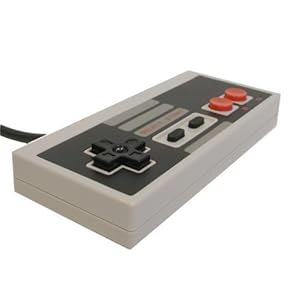
is replaced by

This
:(
is replaced by
This
:(
In order to make life easier on our old school Nintendo fans, the Wii Classic Controller (WCC), and later, the Wii Classic Controller Pro (WCCPro), were created.
First, let's talk about the Wii Classic Controller.
$14.99 U.S. Dollars at GameStop
This controller is for Nintendo fans who want that original game pad feel back. Virtually wireless, the WCC cord connects to your WiiMote nunchuck slot. This means you don't have to move your couch closer to the TV to play a game! Now that wii (get the pun?) know how to hook the WCC up, let's take a look at the buttons:
A,B,X,Y:
Here we have the standard NES button set, with x and y added. These two extra buttons serve no purpose in virtual console games, but are used in some other Wii games that are Classic Controller adaptable.
D-Pad:
We also have a standard Nintendo joy pad all ready for use. I find it slightly less soft to touch than the WiiMote buttons, but maybe that's just me.
Dual Analog Sticks:
These two joysticks are a joyful add-on to the basic NES game pad layout. They don't provide much in the virtual console world, but I hear tell that in some actual Wii games, they come in handy for camera moving, etc.
+,-,HOME:
These buttons serve the exact same purpose as the WiiMote +,-,HOME buttons, but the + and - buttons are aptly named START and SELECT, because they will serve that purpose in the virtual console.
L,R,zL,zR:
This controller has... SHOULDER BUTTONS! Two of which are the standard L/R buttons, and the other two are analog (zL/zR), and are placed closer to the center of the remote.
That's a basic run-down of this controller, let's look at the professional version now:
Wii Classic Controller Pro.
$19.99 U.S. Dollars at GameStop
What makes this so professional? GRIPS! There are only a few minor differences between this controller, and it's predecessor:
1. The color. This controller now also comes in black, just thought I'd add that.
2. The shoulder buttons. This controller now has no analog L/R, but now has an L2 and R2, which I prefer much more.
3. The dual analog sticks. These are now farther apart, which feels much more comfortable on my hands.
4. The professionalism. We now have Pro in the title, which automatically makes this thing awesome.
I also noticed that the WCCPro feels and looks a lot like the PS2 controller. If you like that feel, go with this.
What to buy?
Both of these controllers are great, but if you are going for the classic, NES feel take the WCC for 15 bucks, and if you want something similar to the PS2, buy the 20 dollar Pro version.
Hope I could help you out!
What can you do with squares? (VX RTP Mapping Contest)
What can you do with squares? (VX RTP Mapping Contest)
The following people are getting a message as a reminder that the time is almost up:
-ACEselri
-The_Mad_Poet
-ShortStar
-Scrourge

Want to show RMN what you can do with squares? The time is running out, you have until Sunday, July 31st to submit a map to the RPG Maker VX RTP Mapping Contest!
-ACEselri
-The_Mad_Poet
-ShortStar
-Scrourge
Want to show RMN what you can do with squares? The time is running out, you have until Sunday, July 31st to submit a map to the RPG Maker VX RTP Mapping Contest!
 Games - Tester
 Games - Other
