



 Full Games List
 Featured Games
 New Games
 Reviews
 Media
Media Images
 Blogs
Blogs Game Updates
 Images Feedback Summary
 Game Design Highlights
 Tutorials
 Articles
 Scripts
 Utilities / Plugins
 Resources
 Engines
 Engine Bulletins
 What is Makerscore?
 Past Events
 Achievements
 Misaos
 Forums
 Post History
 Chat
Chat New to RMN?
 Full Store List
 RMN Music Pack (free)



HOW DO YOU MAKE SPRITES?
Posts
Pages:
1
 Benkins
 View playlists
 Close
CloseI'm new to the site, but I've been working on some short little games just for fun in my down time. The program is great, but there are definitely limits to the characters. That's why I want to learn how to make sprites. With this, I can really expand my characters and make them just how I want them. My question is, how do I go about doing this?
Thanks!
Thanks!

The best thing to do is to start by editing sprites. Fiddle with hair and clothes, poses and expressions. Mess with tiles. It's the best way to learn. Then take a few sprite outlines (you can find nude body sprites easily enough) do some colour blocking and try to create your own sprite. Look at some tutorials and ask for critiques in the spriting topic.
Learn gradually.
Learn gradually.
Agree with Liberty. I learned how to make my own sprites just by first editing the ones I already have. Start with the basics. At first, when you zoom in it might look impossible to replicate but it's not. Just mess around with the tiles until you're comfortable. It also helps a lot to look at other peoples stuff... not to copy off of it but just to see how they have done it. Open up someone elses sprite work and see how they've done it, what techniques they may have used, etc. It may not always look right at first, but if you keep playing with it you will quickly catch on.
LockeZ

I'd really like to get rid of LockeZ. His play style is way too unpredictable. He's always like this too. If he ran a country, he'd just kill and imprison people at random until crime stopped.
5958
Right click on charset file
Open in Windows Paint
Profit
Open in Windows Paint
Profit
You do it through practice, thats how everything works! If you want to acquire a skill you must learn on your own, everyone here can help you by opening the door but it's up to you to step inside. Post your sprites on the forum and you will get comments and critique on how to improve, thats how I and a majority of the members learnt.

Practice, practice, practice, and a nice program that you like, it can be MSPaint if you feel comfortable enough. Some even use Photoshop lol.
The main thing is as Liberty said. Start messing stuff, like editing, recolouring... playing with and observing palettes.
Then read some tutorials, like Tsugumo's "So you wanna be a Pixel artist? (the same that Bonehead posted, but from Tsugumo's site and from the start) and Mark's Pixel Tutorial.
There are a lot of others as well, just read the ones you're interested to (1-2 days, this is the easy step). Once you feel like you know all the basic concepts (you will feel it somehow, trust me), it's time to practice!
Have a nice day,
Orochii Zouveleki
The main thing is as Liberty said. Start messing stuff, like editing, recolouring... playing with and observing palettes.
Then read some tutorials, like Tsugumo's "So you wanna be a Pixel artist? (the same that Bonehead posted, but from Tsugumo's site and from the start) and Mark's Pixel Tutorial.
There are a lot of others as well, just read the ones you're interested to (1-2 days, this is the easy step). Once you feel like you know all the basic concepts (you will feel it somehow, trust me), it's time to practice!
Have a nice day,
Orochii Zouveleki

Graphics gale is the way to go. At least, it works for me. Besides, I have an extreme hatred for paint shop...


I can't speak for anyone else, but I usually start with the famitsu site, and attempt to alter from there. "Attempt" being the operative term, of course.

First of all, I'm certainly no expert at making sprites. That said, I have three "secrets" that I use for my projects.
Secret #1
Secret #2
Secret #3
Lastly, here is a quick example of my process, with a wall of text in a hide tag to explain it all...

I started with one of my templates that fit the rough dimensions I had in mind for the character. Initially, I planned for him to wear a full length dark coat like my previous versions of the sprite did, but I figured that was way too generic. A while back though, I had an idea for a private investigator character. It turned out I didn't like the outfit, but it gave me a springboard into the button up shirt and holster harness look.
I tested the look out by pasting the clothes I made onto the template, with one of my stock hairs. It was a good fit. Next, since the character is an archangel, I decided to try making some wings. I roughed them out really quick. When I tried then out with the sprite, it looked okay, but there wasn't as much detail in the wings as there was in the clothing.
Using DPaint2, I made a couple of shading brushes. One with some feather outlines for shadowing, and one with just a few dots sprinkled around for highlights. I used the shade function to darken in the outline of the wings, then shaded lighter on the highlights.
Since I always saw the character having long hair (which went with the trenchcoat aesthetic, I guess), I tried a different look out for him. Ultimately, I wasn't happy with it and just tweaked one of my standard hairstyles a little.
Since I had the basic look for the character established now, and without really having to beat my head against a desk trying to figure out how to get everything to look, I started to focus on his personality.
He's a former archangel who still pulls odd jobs for Heaven, basically a private investigator/bounty hunter. In exchange for fighting people possessed by demons and carrying their tainted souls back, he gets to live on Earth instead of getting torn to shreds by his brothers.
This is not a happy guy. He's seen shit, hell, he's done shit that would turn most people sick. Fact is, he does it on a daily basis! He wears a tie, because he wants to look professional, but at the same time he doesn't really give a damn. His shirt is untucked, it isn't always buttoned up, and his pants are frayed. "Lived in" is an understatement for this guy. Once I put those little touches on, you can pretty much look at him and get an idea of how his average day goes.
Next, I set him in a box to make sure he maintained the right proportions and adhered to the size constraints for use in Rm2k3. He did.
I mocked up a pose with him holding two pistols with his wings showing to see if the grizzled P.I. look still fit with the rest. I was pretty pleased with it.
Then, once I had one direction figured out, I used it to help model the other directions for him. You'll notice that my "facing north" pose for him is still a little off. Because of the shirt I put on him, it looks a little like he's kind of slumping his shoulders forward. Since I might have use for that sort of pose, I'm keeping it. It may be fine to use as part of his normal animations, or it might be the first step into a new gesture that goes into my template folder.
A step that was not really illustrated well would be the removal of the hard black outline. There are many schools of opinion regarding how to go about outlining your sprites. For this character, I liked the look of just using the darkest shade of each color as the border. The one exception is on the face, which still uses the black line. This is just a personal preference, since I've found it helps the character faces to pop better.
Lastly, now that I know pretty much how this guy looks in each direction, I can start moving him into a couple other poses to make sure that everything still works.
Secret #1
Practice! As was said above, start by examining sprites that already exist. Try to figure out how to get the most out of every pixel. I'm amazed at how detailed some sprites can get, even if they only have a total of eight pixels for a head. Once you start to get a feel for which lines you need to weight heavier, and which ones you can kind of smooth over, you'll see a big improvement.
Secret #2
Build a Library. I don't mean that building with the books you need a card to enter, I mean a repository for pre-made parts that you can use. I have a set of templates I made for the basic walking directions for male and female characters. I like to take a basic template, and then just try to make up different looking characters. When I get a piece I really like, be it a hairstyle (which I am still struggling with, hair might be my weakest area), a piece of clothing, a helpful pose I save it for later. This way, when I'm actually trying to make up sprites for a project, I have this reserve of parts I can try out. Knowing that you have basic walking animations and some jumping off points for clothing covered makes it a lot easier to focus on the personality of the sprite instead of just trying to figure out how to make it look like what you want it to.
As an example here is a character sheet from my western in progress.
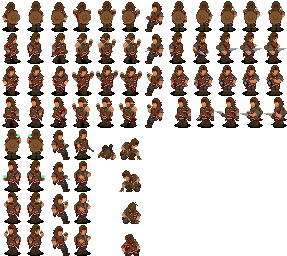
As a practice exercise, I made the surrender, drinking, sitting, quickdraw, eating and aiming poses. When I started making the character, I didn't have to worry about blocking the pose out, I just had to worry about how THIS character looked in a given pose.
As an example here is a character sheet from my western in progress.
As a practice exercise, I made the surrender, drinking, sitting, quickdraw, eating and aiming poses. When I started making the character, I didn't have to worry about blocking the pose out, I just had to worry about how THIS character looked in a given pose.
Secret #3
Deluxe Paint 2 Enhanced. I've used this program since I was a kid back in the late eighties. It was, for a while at least, Lucasarts' go to program. They used it for everything from Secret of Monkey Island to the character graphics in the first Dark Forces game. It was possibly a decade ahead of its time when it first came out, and even now there are things that it still does better than other programs. You can make masks and stencils with a couple of clicks, you can shear and bend things in perspective, you can set it to automatically shade things for you, you can use angular/circular patterns on gradients so that they don't just look like gradients. It has a smooth feature that, when used correctly, can take a slapped together sprite and make it look like someone knew what they were doing with it. If you know what you're doing, you can even set it up to test your animation cells in sequence.
The only downside is that being an ancient piece of software, it is kind of finicky about detecting modern graphics cards. If you're lucky, you can get it running in 1024x768, but you're stuck with a 256 color palette.
If you can't find a copy of it online someplace, I'm pretty sure I've seen a couple of sites that have new programs that are built to replicate its functionality.
The only downside is that being an ancient piece of software, it is kind of finicky about detecting modern graphics cards. If you're lucky, you can get it running in 1024x768, but you're stuck with a 256 color palette.
If you can't find a copy of it online someplace, I'm pretty sure I've seen a couple of sites that have new programs that are built to replicate its functionality.
Lastly, here is a quick example of my process, with a wall of text in a hide tag to explain it all...
I started with one of my templates that fit the rough dimensions I had in mind for the character. Initially, I planned for him to wear a full length dark coat like my previous versions of the sprite did, but I figured that was way too generic. A while back though, I had an idea for a private investigator character. It turned out I didn't like the outfit, but it gave me a springboard into the button up shirt and holster harness look.
I tested the look out by pasting the clothes I made onto the template, with one of my stock hairs. It was a good fit. Next, since the character is an archangel, I decided to try making some wings. I roughed them out really quick. When I tried then out with the sprite, it looked okay, but there wasn't as much detail in the wings as there was in the clothing.
Using DPaint2, I made a couple of shading brushes. One with some feather outlines for shadowing, and one with just a few dots sprinkled around for highlights. I used the shade function to darken in the outline of the wings, then shaded lighter on the highlights.
Since I always saw the character having long hair (which went with the trenchcoat aesthetic, I guess), I tried a different look out for him. Ultimately, I wasn't happy with it and just tweaked one of my standard hairstyles a little.
Since I had the basic look for the character established now, and without really having to beat my head against a desk trying to figure out how to get everything to look, I started to focus on his personality.
He's a former archangel who still pulls odd jobs for Heaven, basically a private investigator/bounty hunter. In exchange for fighting people possessed by demons and carrying their tainted souls back, he gets to live on Earth instead of getting torn to shreds by his brothers.
This is not a happy guy. He's seen shit, hell, he's done shit that would turn most people sick. Fact is, he does it on a daily basis! He wears a tie, because he wants to look professional, but at the same time he doesn't really give a damn. His shirt is untucked, it isn't always buttoned up, and his pants are frayed. "Lived in" is an understatement for this guy. Once I put those little touches on, you can pretty much look at him and get an idea of how his average day goes.
Next, I set him in a box to make sure he maintained the right proportions and adhered to the size constraints for use in Rm2k3. He did.
I mocked up a pose with him holding two pistols with his wings showing to see if the grizzled P.I. look still fit with the rest. I was pretty pleased with it.
Then, once I had one direction figured out, I used it to help model the other directions for him. You'll notice that my "facing north" pose for him is still a little off. Because of the shirt I put on him, it looks a little like he's kind of slumping his shoulders forward. Since I might have use for that sort of pose, I'm keeping it. It may be fine to use as part of his normal animations, or it might be the first step into a new gesture that goes into my template folder.
A step that was not really illustrated well would be the removal of the hard black outline. There are many schools of opinion regarding how to go about outlining your sprites. For this character, I liked the look of just using the darkest shade of each color as the border. The one exception is on the face, which still uses the black line. This is just a personal preference, since I've found it helps the character faces to pop better.
Lastly, now that I know pretty much how this guy looks in each direction, I can start moving him into a couple other poses to make sure that everything still works.
author=Killer Wolf
Deluxe Paint 2 Enhanced
Question : Does DP2 open image files with the *.GEM extension?
I'm not familiar with .gem files.
Compatibility is another problem with using such an old program. DPaint2 uses its own extensions for pictures and brushes, being .lbm and .bbm respectively. It can also save files as .pcx.
What I usually do is save my stuff as a pcx, open the pcx in photoshop and then convert it to a png. If I use dpaint's dedicated background color, I don't even have to correct for the transparency.
Any file that can be converted into a pcx format can be opened in dpaint2, as long as it is in 256 color. Because Dpaint uses a page file that allows you to open two separate files at the same time, you can actually load images up to double the resolution size you are set for, if you sacrifice the second page option.
I've occasionally seen files corrupt for seemingly no reason when you constantly save over the same image, so it is a good idea to back up your work. It only happens with the picture formats though, so I back up critical pieces as brushes.
Also, if you have 500+ files in a directory, it will stop displaying them in the load file menu.
The program is a little temperamental, but for low res stuff I really wouldn't want to work with anything else.
Compatibility is another problem with using such an old program. DPaint2 uses its own extensions for pictures and brushes, being .lbm and .bbm respectively. It can also save files as .pcx.
What I usually do is save my stuff as a pcx, open the pcx in photoshop and then convert it to a png. If I use dpaint's dedicated background color, I don't even have to correct for the transparency.
Any file that can be converted into a pcx format can be opened in dpaint2, as long as it is in 256 color. Because Dpaint uses a page file that allows you to open two separate files at the same time, you can actually load images up to double the resolution size you are set for, if you sacrifice the second page option.
I've occasionally seen files corrupt for seemingly no reason when you constantly save over the same image, so it is a good idea to back up your work. It only happens with the picture formats though, so I back up critical pieces as brushes.
Also, if you have 500+ files in a directory, it will stop displaying them in the load file menu.
The program is a little temperamental, but for low res stuff I really wouldn't want to work with anything else.


Should this be a stickied? It seems very helpful.
Hey I need some help here I want to use shredder in my game but the problem is him and krang
( baddy from TMNT) are TOO big for the chai boxy thingy.
Can I get a larger box like the monsters or how does this work. Krang is now two separate bod parts no and stuff.
Oh also my game seems to make my sprite super tiny or the world is a bit big can I zoom in so I show more detail in my sprite while a person is playing.
To not make my sprites a complete rip off I am making them more like their franchise canon designs krang Recolored. Samus is a bit more modern, umm link is.
He hasn't changed not much to fix.
So do you guys do this say for instance you want to use an old game boy sprite will you color it sometimes or such what do you do with your characters?
Hey I need some help here I want to use shredder in my game but the problem is him and krang
( baddy from TMNT) are TOO big for the chai boxy thingy.
Can I get a larger box like the monsters or how does this work. Krang is now two separate bod parts no and stuff.
Oh also my game seems to make my sprite super tiny or the world is a bit big can I zoom in so I show more detail in my sprite while a person is playing.
To not make my sprites a complete rip off I am making them more like their franchise canon designs krang Recolored. Samus is a bit more modern, umm link is.
He hasn't changed not much to fix.
So do you guys do this say for instance you want to use an old game boy sprite will you color it sometimes or such what do you do with your characters?
Pages:
1

