



 Full Games List
 Featured Games
 New Games
 Reviews
 Media
Media Images
 Blogs
Blogs Game Updates
 Images Feedback Summary
 Game Design Highlights
 Tutorials
 Articles
 Scripts
 Utilities / Plugins
 Resources
 Engines
 Engine Bulletins
 What is Makerscore?
 Past Events
 Achievements
 Misaos
 Forums
 Post History
 Chat
Chat New to RMN?
 Full Store List
 RMN Music Pack (free)



[RMVX ACE] PUSHING AND PULLING OBJECTS
Posts
Pages:
1
 ClavisAnima
 View playlists
 Close
CloseHi all,
I want to be able to push and pull objects when the enter key is held. I don't mind having evented or scripted solutions.
I tried having the object follow the player once the enter key was pressed, however I was unable to stop the object from following the player when the enter key was not being held.
I also cannot figure out how to restrict the movement of players based on how they are facing the object when pushing/pulling. For example, I don't want players to move left or right when they are facing up or down.
I want to be able to push and pull objects when the enter key is held. I don't mind having evented or scripted solutions.
I tried having the object follow the player once the enter key was pressed, however I was unable to stop the object from following the player when the enter key was not being held.
I also cannot figure out how to restrict the movement of players based on how they are facing the object when pushing/pulling. For example, I don't want players to move left or right when they are facing up or down.

Do you want to just push one tile over when you press enter or do you want something where when you hold down enter the object will move, but the player can't move (like pushing blocks in Zelda.)
Getting the block to move once or more is easy for player touch or button press.
Same As event:
Condition branches for each way the player is facing. Then move 1 place in that direction (you can choose whether you want the event to wait or not, but you should tick skip if cannot complete.)
The Zelda method is more difficult to event likely.
I wouldn't even bother trying to event it. It's too hard.
Script would be easier.
I would like the zelda method since that allows for pushing and pulling since I'll have puzzles like this:
I can trying making something with events later today if this is not solved by then. I would be easier if instead of holding a key, you press it to toggle pushing on/off.
author=Link_2112
I can trying making something with events later today if this is not solved by then. I would be easier if instead of holding a key, you press it to toggle pushing on/off.
Ok cool, thanks :)
I got it working for one object, but I'm trying to make it so you can easily copy and paste it for endless pushing objects without much code. It shouldn't be hard but I'll finish it up tomorrow. Already spent several hours on this heh It's a good exercise though. I will end up using it for my game, too, and I'll submit it as a tutorial. So I'll profit off this heh

author=Link_2112cool!
and I'll submit it as a tutorial. So I'll profit off this heh
author=Link_2112
I can trying making something with events later today if this is not solved by then. I would be easier if instead of holding a key, you press it to toggle pushing on/off.
Just a quick question. Since toggling is easier, would having a little animation or graphic appear be best for showing the player that pushing has been toggled on?
author=ClavisAnimaauthor=Link_2112Just a quick question. Since toggling is easier, would having a little animation or graphic appear be best for showing the player that pushing has been toggled on?
I can trying making something with events later today if this is not solved by then. I would be easier if instead of holding a key, you press it to toggle pushing on/off.
Yes, you could have the sprite do a push pose, like in Link to the Past.
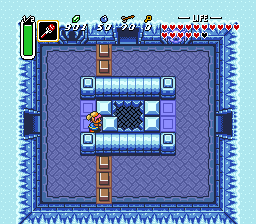
I ended up going out all day yesterday, and there's a big storm happening, so I'll have plenty of time to finish this up today.
Wow, it was such a simple thing that I hadn't noticed. Ace no longer lets you set a page condition to be equal to a variable, it's always equal or greater. So all the events kept activating. Found a simple fix and it works now.
https://rpgmaker.net/media/content/users/9179/locker/PushPull.zip
Open this project.
I recommend reading the comments, so open the event on the first map. It's clearly marked ha
When you are done go to the second map. Copy any of the 3 events, they are all the same.
Open your project, and paste it. Change switch 1121 if you are already using it. Or name it, if it was unused. As it will have no name. Do the same for variables 1121.
Sw 1121 ALLOW push/pull
Var 1121 Object ID
You will want to make changes to it. To the graphic, sound. If you want to change hero graphic to a pushing sprite, add that to the spot where the hero's direction is locked. Don't forget to change it back in the right spot.
Other than that you copy and paste as many as you want and change 3 variable spots. It's listed in the comments of the first map event which ones to change.
Let me know how it goes.
edit: *It should work, but I discovered a bug with the region ID system I included. I'm going to try and fix that and I will reupload*
*Nevermind, turns out it's too complicated to work in the region ID detection system. I'll just keep it simple.*
https://rpgmaker.net/media/content/users/9179/locker/PushPull.zip
Open this project.
I recommend reading the comments, so open the event on the first map. It's clearly marked ha
When you are done go to the second map. Copy any of the 3 events, they are all the same.
Open your project, and paste it. Change switch 1121 if you are already using it. Or name it, if it was unused. As it will have no name. Do the same for variables 1121.
Sw 1121 ALLOW push/pull
Var 1121 Object ID
You will want to make changes to it. To the graphic, sound. If you want to change hero graphic to a pushing sprite, add that to the spot where the hero's direction is locked. Don't forget to change it back in the right spot.
Other than that you copy and paste as many as you want and change 3 variable spots. It's listed in the comments of the first map event which ones to change.
Let me know how it goes.
edit: *It should work, but I discovered a bug with the region ID system I included. I'm going to try and fix that and I will reupload*
*Nevermind, turns out it's too complicated to work in the region ID detection system. I'll just keep it simple.*
Thanks for the help, Link! :)
I just noticed that "push object 13" next to the crystal didn't move as expected since the wrong variable was referenced. I got it working by setting the variable to Object ID.
Other than that, everything worked fine.
I just noticed that "push object 13" next to the crystal didn't move as expected since the wrong variable was referenced. I got it working by setting the variable to Object ID.
Other than that, everything worked fine.
Great. You're welcome. Ah, I might have messed something up. I made a bunch of hasty last minute changes to it. I'll double check it, or you might have gotten the old version or something. (If your version of the event has anything with X,Y coordinates and Region ID, it's the old version. Download it again)
Pages:
1

