



 Full Games List
 Featured Games
 New Games
 Reviews
 Media
Media Images
 Blogs
Blogs Game Updates
 Images Feedback Summary
 Game Design Highlights
 Tutorials
 Articles
 Scripts
 Utilities / Plugins
 Resources
 Engines
 Engine Bulletins
 What is Makerscore?
 Past Events
 Achievements
 Misaos
 Forums
 Post History
 Chat
Chat New to RMN?
 Full Store List
 RMN Music Pack (free)



THE MOST BAFFLING THING I'VE SEEN RPG MAKER DO IN 14 YEARS OF RPGMAKING
Posts
Pages:
1

 Max McGee
 View playlists
 Close
CloseGuys this is really weird. It's so weird and inscrutable I don't really expect anyone to actually be able to help, but maybe someone else has had this problem. Obviously this'd be easy for me to workaround with a workaround, so the issue is more just that I have no idea why this can be happening in the first place, or how it's even possible.
BAFFLING PASSABILITY GLITCH
So there's not a lot to setting passability in RPG Maker (VX Ace in this case). If you click the tile so it shows an X on the tile, you can't walk through the tile. If you click the tile so it shows an O, you can walk through it. It's kind of monkey simple. Not a lot of room for either human error or computer glitches. Well...
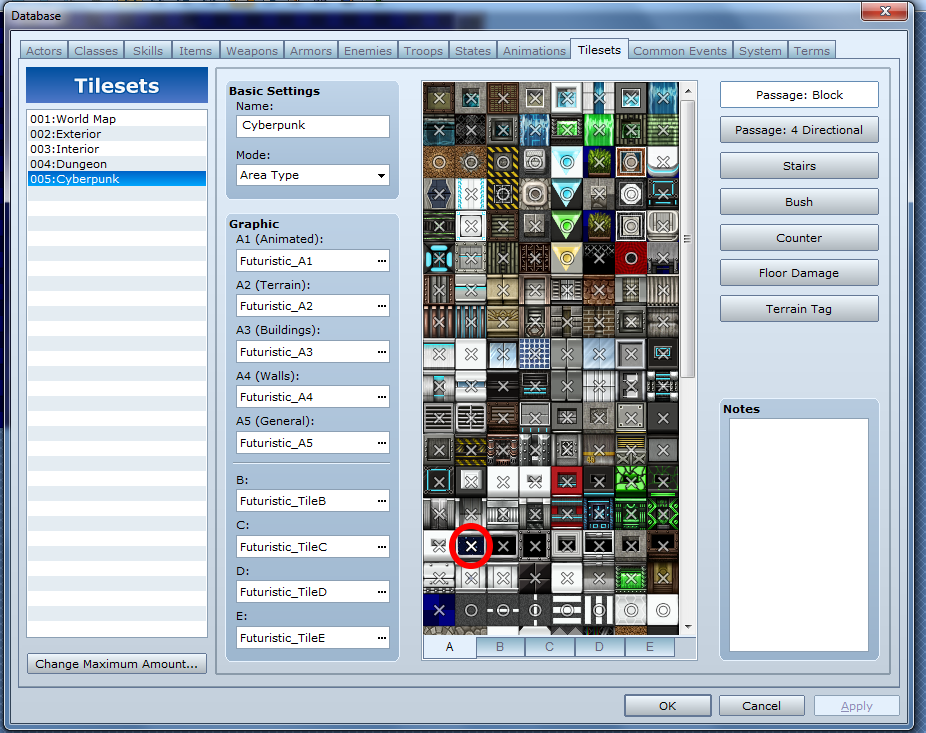
So there's no trick here. There's only one tileset with these tiles, and there's only one tile in this set that looks like this particular space window. And it's clearly set to X. I checked all the other passability settings, the stairs, bush, counter, whatever tags. They're all off. The only thing on that tile is an X. But...

As you can clearly see here...it is passable. Why? No other tile that shouldn't be passable is. Just that one. So it's not like the player sprite is stuck on "Passage ON" or whatever. How is this possible? I mean, computers are deterministic, right? They don't just randomly do inexplicable shit cause they feel like it, right?
Could it have something to do with a script? These are the scripts I have in the project right now.

I don't think any of them should, could, or would be effecting tile passage settings. Few of them even effect the on-map gameplay at all. Most of them are battle and menu modifications. And the ones that do effect the map_scene shouldn't be effecting passability. But I've been wrong before.
BAFFLING PASSABILITY GLITCH
So there's not a lot to setting passability in RPG Maker (VX Ace in this case). If you click the tile so it shows an X on the tile, you can't walk through the tile. If you click the tile so it shows an O, you can walk through it. It's kind of monkey simple. Not a lot of room for either human error or computer glitches. Well...
So there's no trick here. There's only one tileset with these tiles, and there's only one tile in this set that looks like this particular space window. And it's clearly set to X. I checked all the other passability settings, the stairs, bush, counter, whatever tags. They're all off. The only thing on that tile is an X. But...
As you can clearly see here...it is passable. Why? No other tile that shouldn't be passable is. Just that one. So it's not like the player sprite is stuck on "Passage ON" or whatever. How is this possible? I mean, computers are deterministic, right? They don't just randomly do inexplicable shit cause they feel like it, right?
Could it have something to do with a script? These are the scripts I have in the project right now.
I don't think any of them should, could, or would be effecting tile passage settings. Few of them even effect the on-map gameplay at all. Most of them are battle and menu modifications. And the ones that do effect the map_scene shouldn't be effecting passability. But I've been wrong before.

I doubt you, being an RPG Maker veteran, haven't already checked these options, but I'll still suggest them just to make sure: Did you look at the Passage: 4 Directional Settings whether something is wrong there? Did you place a passable event at that same spot? Did you accidentally put another passable tile on the higher layer at the same spot? Are there any additional tileset options that could cause this error?

It might be that an invisible B-E tile is overlaying your base tile and thus, overwriting the default setting of X.
Also, check the 4 directional passage to make sure all the arrows on that tile are OFF.
The Region effects script might also be the issue - if a region is set to let a character walk on it, it might overwrite the default setting of X (had that happen a few times).
Might also be the Event Chase script since it deals with events and movement. Maybe.
Also, check the 4 directional passage to make sure all the arrows on that tile are OFF.
The Region effects script might also be the issue - if a region is set to let a character walk on it, it might overwrite the default setting of X (had that happen a few times).
Might also be the Event Chase script since it deals with events and movement. Maybe.
There's no event on that spot. There is no 'Passage: 4 Direction" OPTION for that type of tile--that option is blank in VX Ace on all tiles in A1 through A4--but on further testing the tile does seem to be enter-able from the bottom, but not the top or sides, which is very strange.
That spot has the same invisible higher level tiles as all the tiles around it, so I don't think it's that. And there aren't any additional tileset options I can think of.
Finally, there are no Regions "painted" on this tile or in fact on this map. The functions of the Region script don't interact with passability, either, as far as I can tell. The region hash works like this...
And doesn't seem to effect tile passability at all. Anyway, in any case there are no regions on this map.
That spot has the same invisible higher level tiles as all the tiles around it, so I don't think it's that. And there aren't any additional tileset options I can think of.
Finally, there are no Regions "painted" on this tile or in fact on this map. The functions of the Region script don't interact with passability, either, as far as I can tell. The region hash works like this...
region => ["sound", vol, pitch, event_id, common_event_id]]
And doesn't seem to effect tile passability at all. Anyway, in any case there are no regions on this map.
OH! There is an issue with using shift mappage on roof tiles. Basically, a shifted piece of the tile will count as O. It's the outlines that become X It's the top and sides that become the X, with the walls blocking the bottom, so since that tile is technically a roof tile in the set-up, if there's an un-edged part (say behind the boxes) that might be is the cause.
I just checked it in another game.
I just checked it in another game.
Wait, say WHAT? So if I re-tile over the whole thing without pressing shift, it should work? Hmm...that didn't SEEM to work.
No, sorry. Basically, the bottom of a roof tile is considered O. The sides and top are X. (If you do some shift mapping and leave the top or sides open they become O but that's not the issue here.) Usually roof tiles have the walls beneath them, blocking off access. Since this tile is in a roof tile spot it's making it do this. Just move it to another spot instead or use a region block/blank B-E tile set to X to overwrite the passability.
Sorry for the confusion.
(I had this happen a few times when doing shift mapping with half-tiles for walls. XD)
Sorry for the confusion.
(I had this happen a few times when doing shift mapping with half-tiles for walls. XD)
No problem for the confusion and thank you for the quick help! I know it's not a big deal as far as the game is concerned, I was just so confused! It was kind of like one time you drop a nickel and it falls up instead of down!
Oh, ok...I didn't realize that. So the bottom of a roof tile is O? Has it always been that way, or is that a new thing to VX Ace?
Oh, ok...I didn't realize that. So the bottom of a roof tile is O? Has it always been that way, or is that a new thing to VX Ace?
It's new to Ace, I think.
To be really basic, roof tiles act a bit like a cliff you can walk on - the bottom tile allows access if there's no wall tile blocking (say, cliff stairs) and the confines are the edges. I guess it comes in handy for making cliffs that can be walked on from level to level, but for in-door housing it's a bit odd.
So think back to 2k/3 where you'd use arrow passability to allow walking up to a cliff tile edge, but not from certain directions, thus making the cliff unaccessible bar from the spot connecting it to the ground. (Ramps or ladders or whatnot)
Ace does that automatically. It's a neat hidden feature, even though a bit weird. XD
I'm just glad I had the experience of that oddity to help. This could have become the next mystery of RM~
To be really basic, roof tiles act a bit like a cliff you can walk on - the bottom tile allows access if there's no wall tile blocking (say, cliff stairs) and the confines are the edges. I guess it comes in handy for making cliffs that can be walked on from level to level, but for in-door housing it's a bit odd.
So think back to 2k/3 where you'd use arrow passability to allow walking up to a cliff tile edge, but not from certain directions, thus making the cliff unaccessible bar from the spot connecting it to the ground. (Ramps or ladders or whatnot)
Ace does that automatically. It's a neat hidden feature, even though a bit weird. XD
I'm just glad I had the experience of that oddity to help. This could have become the next mystery of RM~
Yeah it would make visual sense for a cliff-top, I guess, but it's kind of nonsensical for almost all roof tiles that I've seen, including this one. Since most A4/roof tiles aren't used as a cliff, it didn't even occur to me it could have that functionality as a hidden default.
Anyway I feel kind of embarrassed that I made such a big deal out of it when the solution was so simple, but actually I'm really glad that the mystery was solved quickly so I can get back to working on my game, because this had me basically just scratching my head for like an hour and a half. : )
Anyway I feel kind of embarrassed that I made such a big deal out of it when the solution was so simple, but actually I'm really glad that the mystery was solved quickly so I can get back to working on my game, because this had me basically just scratching my head for like an hour and a half. : )
XD
Yeah, I understand that. It's odd that the help file doesn't say anything about it, so if I hadn't encountered it myself a while ago you might have been waiting a while. I'm not sure many people even know about it.
...I'm still learning new things about Ace, even now, and that's just default shit. >.<;
Yeah, I understand that. It's odd that the help file doesn't say anything about it, so if I hadn't encountered it myself a while ago you might have been waiting a while. I'm not sure many people even know about it.
...I'm still learning new things about Ace, even now, and that's just default shit. >.<;
This is the same thing that's been baffling and confusing me about Ace. It's kind of reassuring, knowing I'm not the only one.

Not to necro but it's relevant. I fussed with this problem for about 2 hours in MV today, including getting some absolutely terrible advice from another site. So if any of you run into this passibility problem in MV the solution is the same as Liberty says with VXA. Shift-clicking with roof tiles is still a problem.
Pages:
1

