



 Full Games List
 Featured Games
 New Games
 Reviews
 Media
Media Images
 Blogs
Blogs Game Updates
 Images Feedback Summary
 Game Design Highlights
 Tutorials
 Articles
 Scripts
 Utilities / Plugins
 Resources
 Engines
 Engine Bulletins
 What is Makerscore?
 Past Events
 Achievements
 Misaos
 Forums
 Post History
 Chat
Chat New to RMN?
 Full Store List
 RMN Music Pack (free)



[VX ACE] MESSAGE SYSTEM
Posts
Pages:
1
 wootch
 View playlists
 Close
Close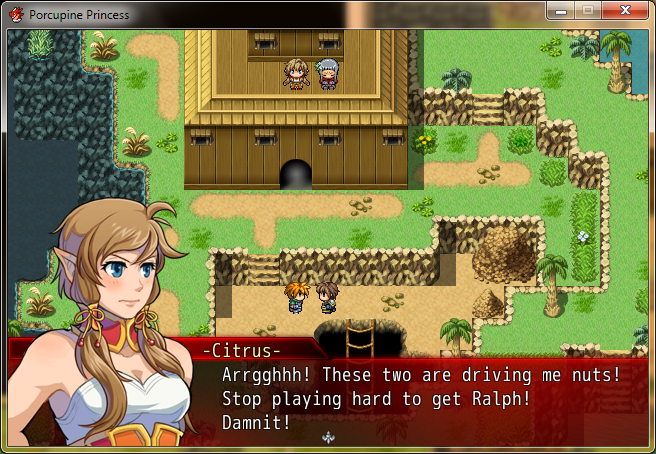

I'm pretty sure this was done with pictures, no script necessary.
A picture for the message background, a picture for the face. Make an empty faceset and use in your message to push the text over. Before the message set the text box to invisible, call the message back into position (show picture) do the same for the face.
Remember to erase pictures after the message. Easy~
A picture for the message background, a picture for the face. Make an empty faceset and use in your message to push the text over. Before the message set the text box to invisible, call the message back into position (show picture) do the same for the face.
Remember to erase pictures after the message. Easy~
author=Liberty
Make an empty faceset and use in your message to push the text over.
I didn't think about that ^^" Thx !

Don't forget to make all the picture calls common events!!! D'8


And here's a tutorial with a snippet on it.
http://divisionheaven.wordpress.com/tutorials/emotion-manipulation-magic/
http://divisionheaven.wordpress.com/tutorials/emotion-manipulation-magic/
yeah thx again.
I also use a message script to set x and y for the text so i do not need any blank faceset. Plus i made some common events to change this x and y with some kind of pictures. It's really easy to set now.
;)
I also use a message script to set x and y for the text so i do not need any blank faceset. Plus i made some common events to change this x and y with some kind of pictures. It's really easy to set now.
;)
Pages:
1

